Home / Features / Landlords / Stay on top

4 of 4

Stay on top

Your figures, the people who help you, and a first draft when you need one.

Tax-year reports and forecast

Your tax year under HMRC’s headings, and the next 12 months ahead.

  • Totals by SA105 heading
  • A pack for your accountant
  • A forecast with void risk
All 10 things Reports does
  • Totals by SA105 heading, with mortgage interest shown separately as a finance cost
  • Figures for each property
  • Expenses that have no receipt, flagged before you send anything
  • A statement PDF, and an accountant pack: a ZIP with the PDF, spreadsheets and receipts
  • Before you make the pack, choose the period and accounting basis, and see how many expenses are missing a receipt or a category, with links to fix them
  • Your accountant can download the pack from their own login (Basic and above)
  • A 12-month forecast: expected rent and costs by month, with new lets after the empty weeks you choose and a rent rise at each review
  • Void risk: the tenancies that could leave a unit empty, such as one ending or in arrears, and the rent lost while it’s empty
  • Rent reviews: when you can serve a Section 13 notice, and the earliest date a new rent could start
  • “Explain with Keymews AI” talks through your tax-year figures or forecast in plain English (Premium)

The forecast is on every plan. Reports group your records and the forecast projects them forward; neither is tax or financial advice. How the forecast works.
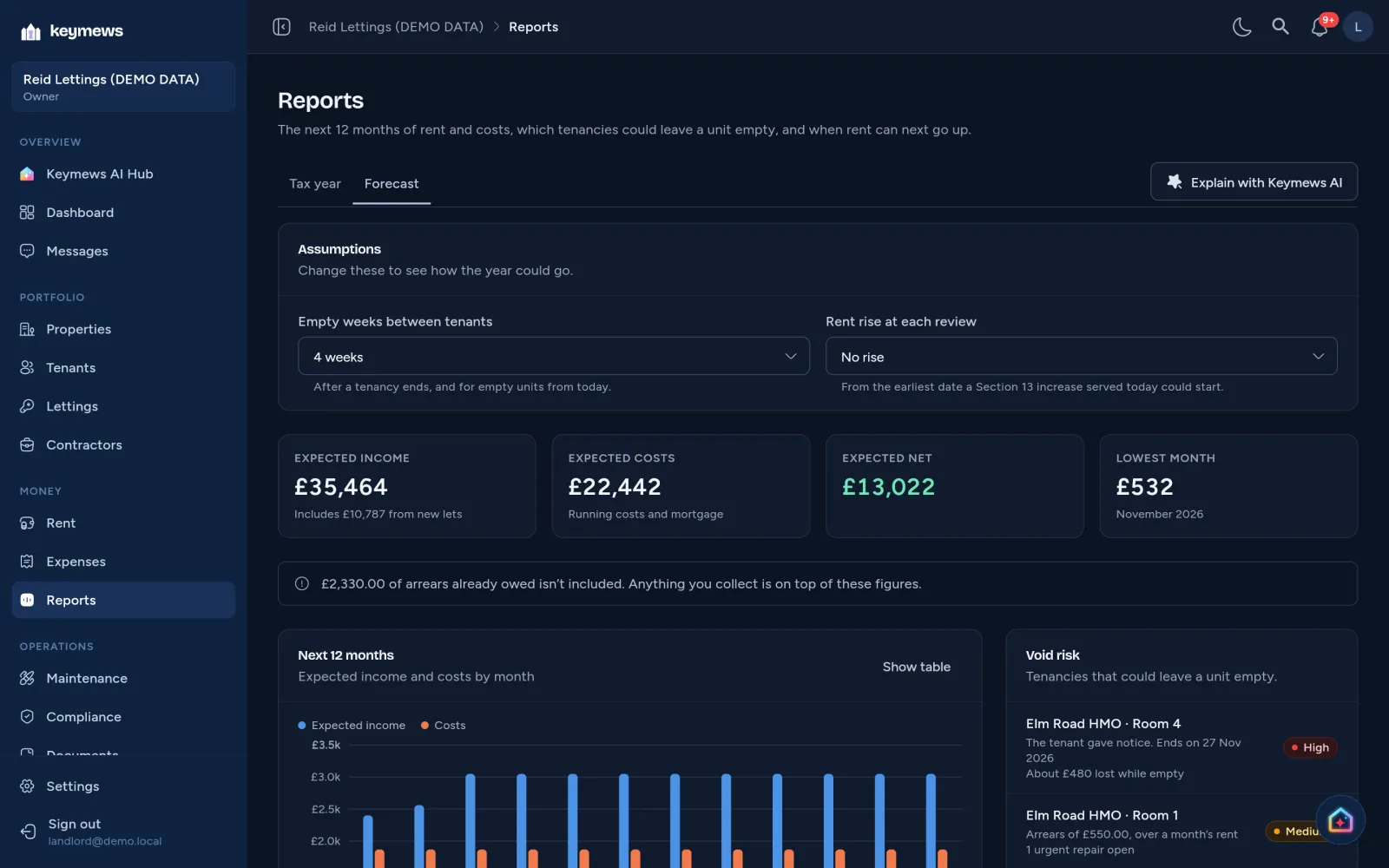
The Forecast tab of Keymews Reports in dark mode, on demo data: assumptions of 4 empty weeks between tenants and no rent rise, expected income of £35,166, costs of £22,442 and net £12,724 over 12 months, a monthly chart of income and costs, and two tenancies at high void risk, one ending on 15 Nov 2026.

Team and shared ownership Basic and above

Invite an admin and your accountant, and choose what each one sees.

  • Access limited to chosen properties
  • Accountants see the books read-only
  • A joint owner sees only the shared house
All 5 things Team does
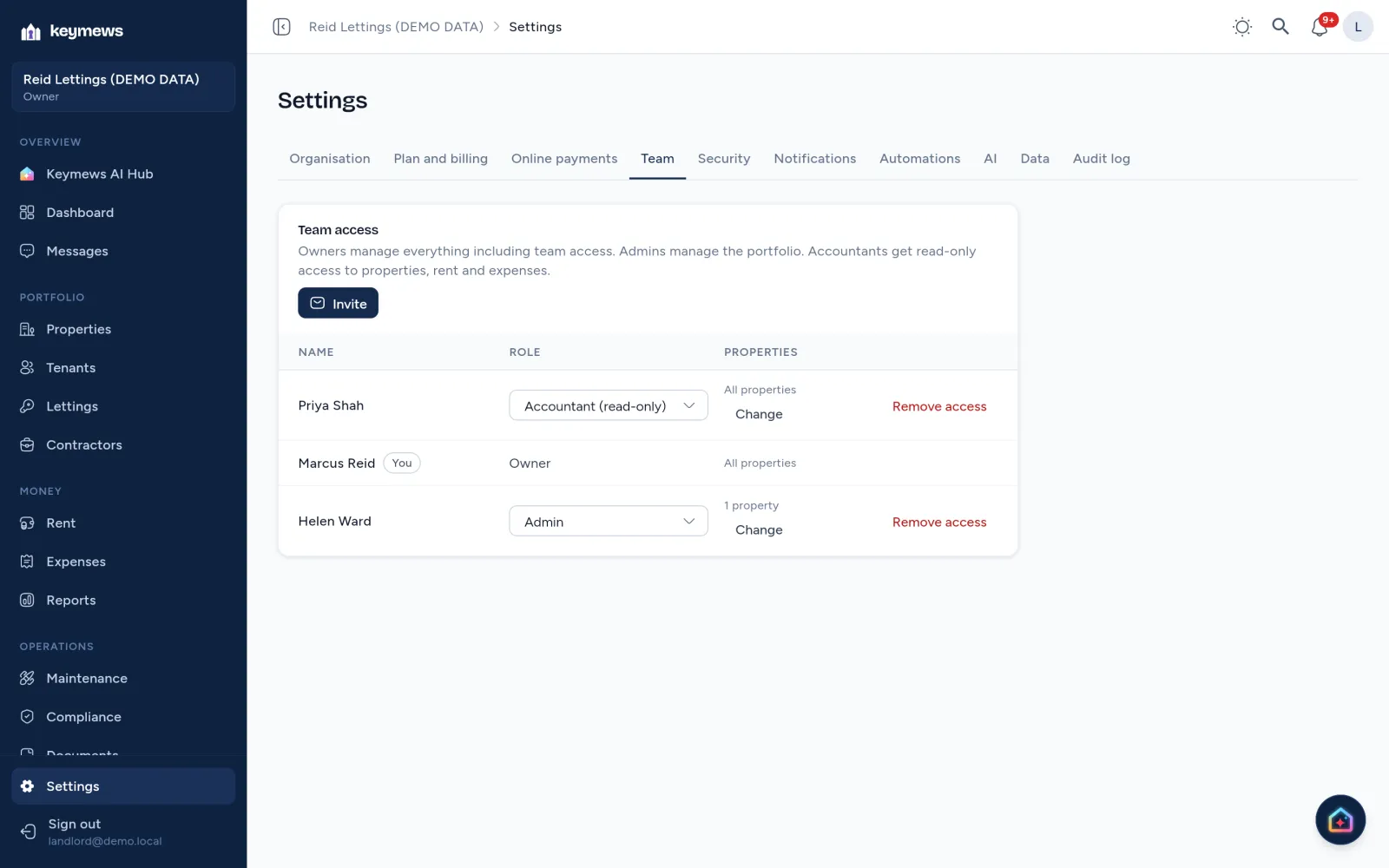
  • Admins manage the portfolio with you; accountants see the books read-only
  • All properties, including ones you add later, or only the ones you tick
  • Work with another landlord, such as a joint owner of one house, without showing them the rest of your portfolio
  • Someone limited to selected properties doesn’t see the others anywhere: not in lists, reports, alerts or messages
  • Change who sees what at any time in Settings → Team

How many admins and accountants depends on your plan: compare plans. Team guide.

Settings → Team on demo data: the owner and an accountant see all properties, and Helen Ward, an admin, sees 1 property, with Change beside each.

Keymews AI Premium

Your most urgent tasks, with a draft one click away.

  • Drafts rent reminders and repair replies
  • Reads receipts and gas certificates for you
  • Never sends or changes anything without you
All 13 things Keymews AI does
  • The Keymews AI Hub and a card on your dashboard list what needs you most: overdue or expiring compliance, urgent repairs, overdue rent and tenancies ending
  • Each task has a button worded for it, such as “Draft booking request”, “Draft rent reminder” or “Draft reply and next steps”, a direct action like “Record payment”, and “Later” to put it off
  • Send a draft to the tenant’s Messages thread and mark the task done, and see how many you’ve done this week
  • Suggested questions from your own records, such as “Summarise October’s rent”
  • Answers say which of your records they drew on, with a thumbs up or down to tell us how they did
  • Answers from your own records when you allow it: “Who’s behind on rent?”, “When does the gas certificate at Elm Road expire?”, “What have I spent on repairs this tax year?”
  • “Explain with Keymews AI” on Reports: your tax-year figures or 12-month forecast in plain English
  • Snap a receipt and it fills in the expense: supplier, date, amount and category, for you to check
  • Photograph a gas safety certificate and it fills in the dates and reference, shown beside the photo for you to check before anything is saved
  • Suggests a repair’s priority, any safety step, and a reply to the tenant
  • “Draft with Keymews AI” on enquiries, arrears and repairs
  • Drafts and suggestions only: it never sends messages or changes your records without you
  • No tenant names or contact details are shared with it; your conversations can be deleted

General information, not legal advice. Compare plans.

A draft from Keymews AI, recorded on demo data.