Home / Features / Landlords / Run the tenancy

2 of 4

Run the tenancy

Properties, tenancies, rent, documents and messages, all linked to each other.

Properties

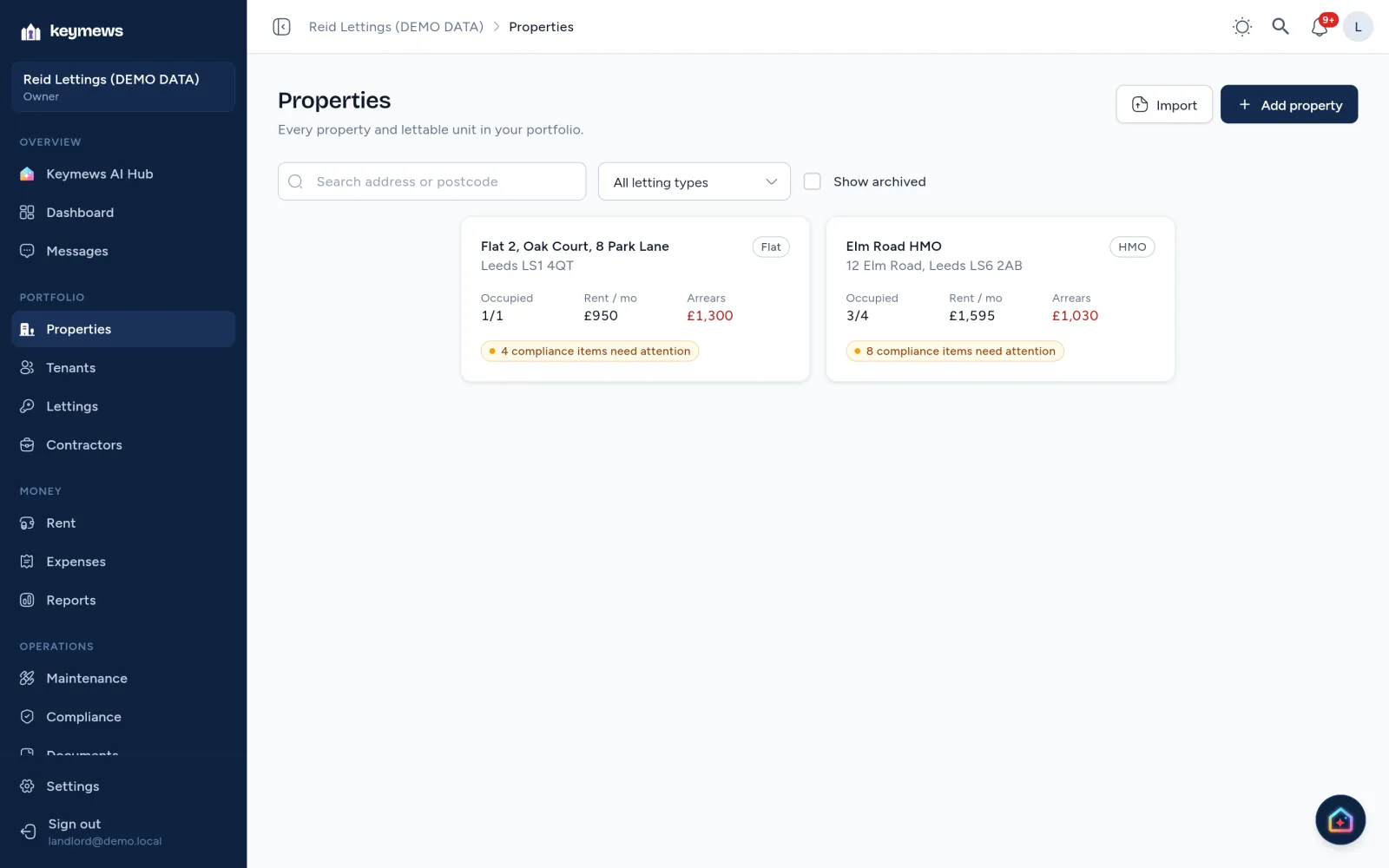
Every property you let, with occupancy, rent and arrears at a glance.

  • Houses, flats, HMOs and commercial
  • Import from your spreadsheet
  • Search everything from the top bar
All 7 things Properties does
  • House, flat, HMO or multi-unit, with units created for you
  • Commercial property too: offices, shops, industrial units, warehouses and more, with the compliance that applies to them (EPC, fire risk assessment and legionella)
  • Moving from a spreadsheet? Import your properties and current tenancies when you start, with a preview first
  • Search everything from the top bar: properties, tenants, repairs, applications and settings
  • Address lookup by postcode
  • Ownership, purchase, mortgage and insurance details
  • Archive a property you no longer let
Keymews Properties on demo data: a flat and an HMO with occupancy, monthly rent, arrears and compliance items needing attention.

Tenants and tenancies

Each let in one record, set up in four steps.

  • Rent, deposit and notices together
  • A written statement of terms, made for you
  • A portal for every tenant
All 8 things tenancies do
  • A four-step setup: unit and tenants, rent, deposit, review
  • Periodic tenancies, with the rent frequency and due day
  • Deposit record and protection deadline
  • Notices recorded, with warnings on short notice periods and rent increases within 12 months
  • A written statement of terms, made from the tenancy’s details
  • A rent increase helper: the earliest valid date for a Section 13 notice, and the rent changes on that date
  • Tenancy readiness: references, documents, signatures, the deposit and each tenant’s portal at a glance, linked to what needs doing
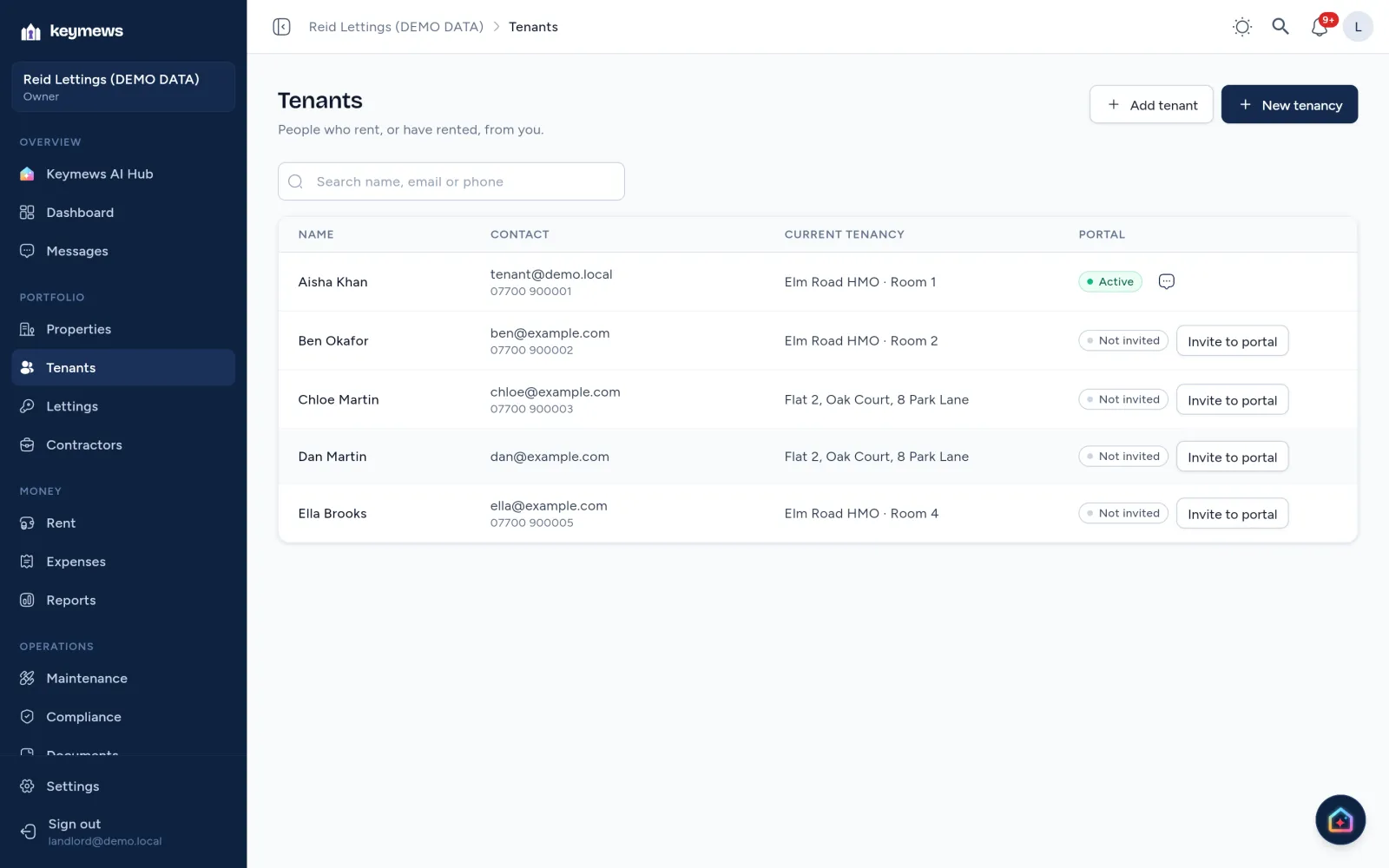
  • Invite tenants to their own portal
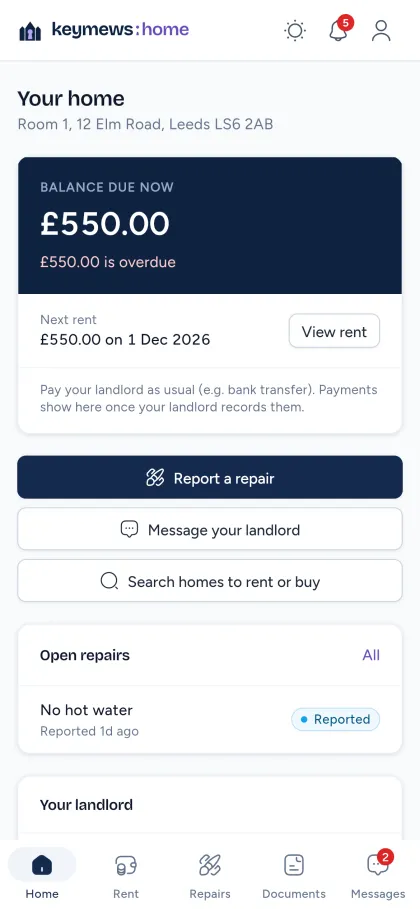
Keymews Tenants on demo data, with each tenant’s portal status.The tenant portal on a phone: balance due, next rent and buttons to report a repair or message the landlord.

Rent and money

A rent schedule for each tenancy, with arrears worked out for you.

  • Import your bank statement
  • Arrears by age, on the dashboard
  • Tenants can pay online (Basic and above)
All 8 things Rent does
  • Charges created automatically for each rent period
  • Record full, part or over payments; they’re allocated oldest first
  • Arrears ageing: 0 to 30, 31 to 60 and over 60 days
  • Import a bank statement (CSV or spreadsheet): each payment is matched to a tenancy, likely duplicates are flagged, and nothing is recorded twice
  • Save a payment’s bank reference once, and later statements match it to the tenancy for you
  • Printable rent statements and CSV export
  • Expenses by category with receipts, and net cash flow on the dashboard
  • Recurring expenses, such as insurance or a mortgage payment: each one due waits for you to confirm it before it counts in your reports

On Basic and above, tenants can also pay rent, deposits and permitted charges online by Direct Debit or card, straight into your own Stripe account. Online payments are added to the ledger for you, and a failed Direct Debit can be tried again; the tenant is told.

Recording a payment, recorded on demo data.

Documents and e-signatures

Files kept against their property, tenancy or repair, and signed online.

  • Shared with the tenant when you choose
  • E-signatures with a signing certificate (Basic and above)
  • Private links that expire
All 5 things Documents does
  • Upload several files at once, up to 25 MB each
  • Opt-in sharing with the tenant, who sees it in their portal
  • Files open through links that expire after five minutes
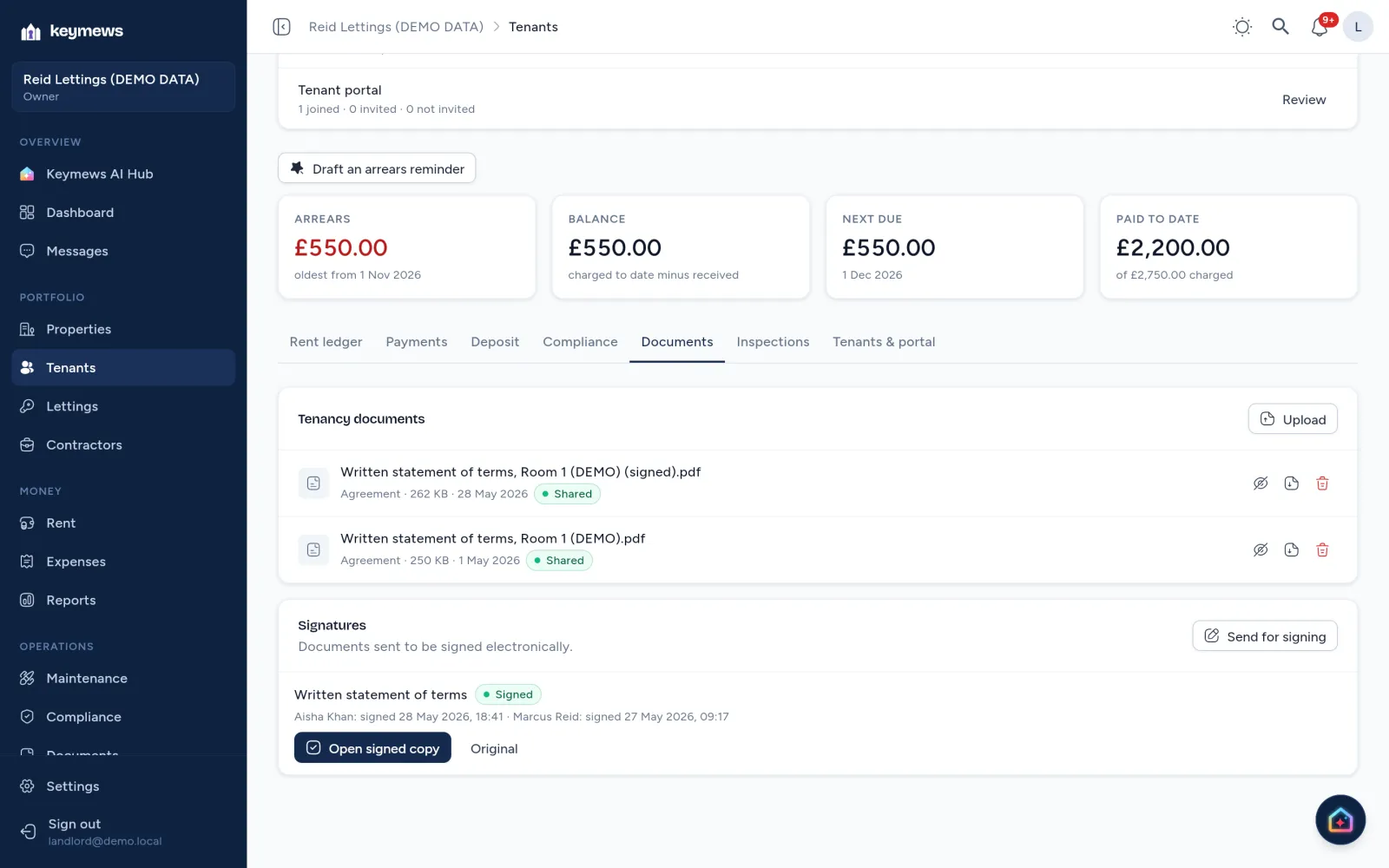
  • E-signatures on Basic and above: tenants sign in their portal, and everyone gets a sealed copy with a signing certificate
  • A record of who viewed and signed, and when, and a check that the document hasn’t changed since it was sent

How many signing requests depends on your plan: compare plans.

A tenancy’s documents on demo data: the written statement of terms and its signed copy, both shared with the tenant, and the signing record showing the landlord and tenant signed on 27 and 28 May 2026.

Messages and reminders

A conversation for each tenancy, and reminders at the timings you choose.

  • Photos, files and read receipts
  • Rent and certificate reminders, sent for you
  • Quiet hours overnight
All 12 things Messages does
  • Messages with photo and file attachments, and read receipts; with contractors and your team too on Basic and above
  • In-app notifications for overdue rent, expiring certificates, new repairs and messages
  • Notifications on your phone and computer too, on every plan: turn them on for each device you use
  • Choose which notifications you get, in the app, by email or on your devices, for rent, compliance, repairs and messages
  • Quiet hours: between 9pm and 8am they wait until the morning and arrive together
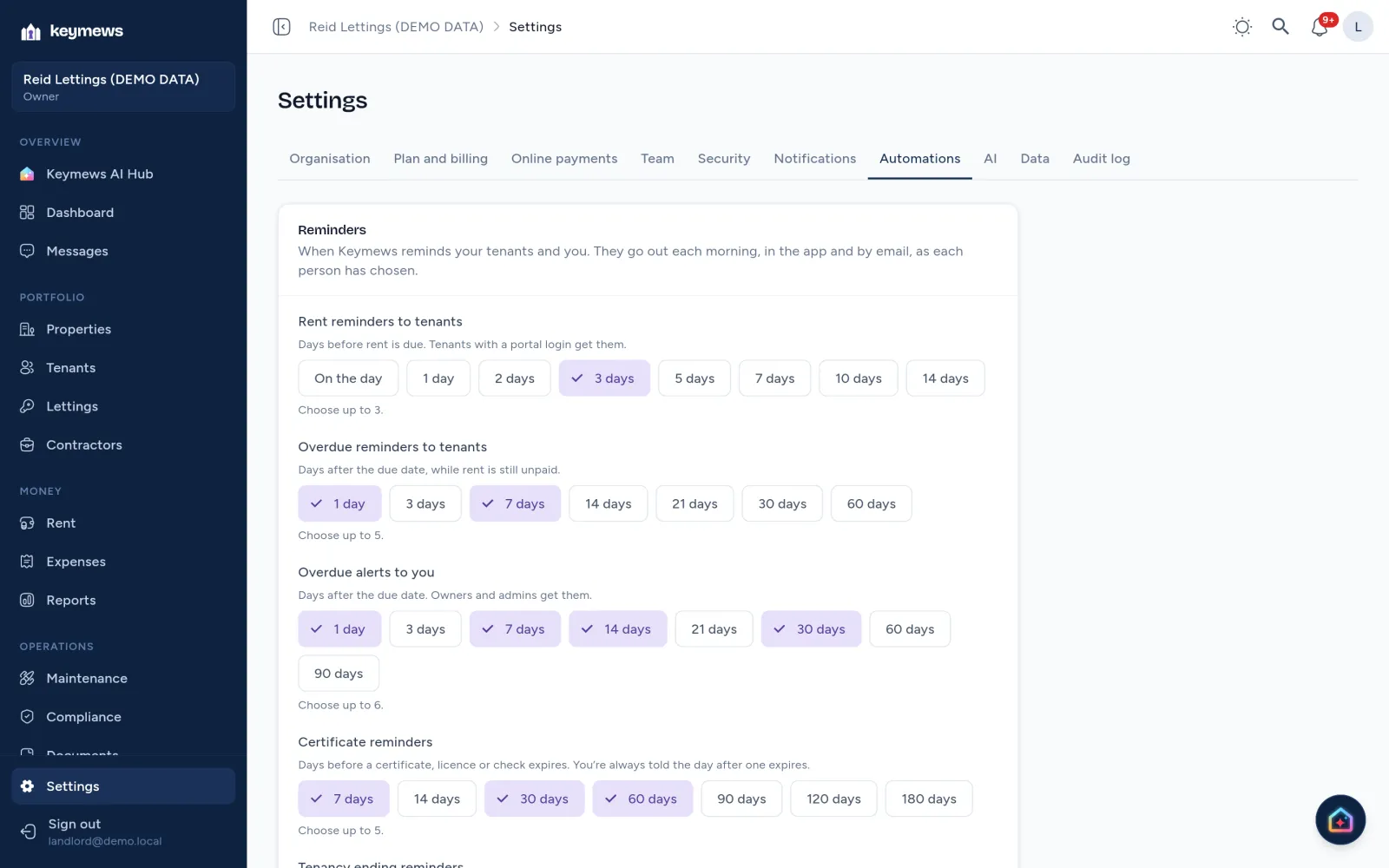
  • Choose when reminders go out: days before rent is due, after it’s overdue, before a certificate expires or a tenancy ends
  • Preview the reminder dates for any due date before you rely on them
  • A history of reminder emails: sent, accepted by the email service, or failed
  • Download viewings, repair visits, compliance dates and tenancy end dates as a calendar file
  • Escalation rules: when overdue rent becomes urgent and the tenant gets a final reminder, and how long an emergency repair can wait unassigned
  • A weekly summary email every Monday on Basic and above: rent overdue and due, certificates, repairs and lettings
  • Email reminders when email delivery is set up; the app tells you plainly when it isn’t
Settings → Automations on demo data: rent reminders to tenants 3 days before rent is due, overdue reminders to tenants after 1 and 7 days, overdue alerts to the landlord after 1, 7, 14 and 30 days, and certificate reminders 7, 30 and 60 days ahead.